

AI for Volunteer Recruitment: From Google to Generative Engines
The Top Line:
Google isn’t the only place volunteers go to find opportunities anymore. They’re asking ChatGPT, Copilot, and AI‑powered search engines for recommendations. In this post, we’ll show you how to adapt your recruitment strategy for the age of generative AI – from optimizing your content for AI tools to using prompts that write your volunteer descriptions in seconds.
Read on to Discover:
- How AI Has Changed Volunteer Discovery
- Quick-Reference: SEO vs. AI Search (GEO)
- AI Prompt Guide for Volunteer Recruitment
Today, your ideal volunteers aren’t just searching Google. They’re asking AI-powered tools like ChatGPT, Google’s AI Overviews, and Microsoft Copilot for recommendations.
So how do you ensure your volunteer opportunities get cited as the answer when a potential volunteer asks, “Where can I find meaningful volunteer opportunities near me?”
Let’s look at how AI has changed the game and how you can leverage it to find more, better-aligned volunteers.
How AI Has Changed Volunteer Discovery
The way people search for information is evolving. Volunteers today are as likely to ask a generative AI tool a question as they are to type keywords into a traditional search bar.
This shift has given rise to Generative Engine Optimization (GEO). Traditional SEO focuses on getting your link to rank on page one of search results. GEO focuses on getting your organization’s content cited as a trusted source in AI-generated answers.
The goal has shifted from being a blue link to being the answer the AI chooses to provide.
The AI-First Volunteer Recruitment Strategy
Step 1: Optimize Your Content for AI Comprehension
AI models read your content differently than humans do. They look for structured, authoritative information they can easily extract and cite.
Here’s how to ensure your volunteer opportunities are AI-ready:
-
Write for Questions, Not Just Keywords: Structure your content using question-based subheadings (e.g., “What does a food pantry volunteer do?” followed by a direct answer). AI tools love this format because it allows them to extract your content as a direct response to user queries.
-
Minimum 150 Words Per Role: According to experts, AI models prefer roles described with at least 150 words broken into clear headers, helping the AI fully understand your content.
-
Use Geo-Ready Title Format: Structure your volunteer role titles as
{Role Name} Volunteering in {Location}(e.g., “Dog Walker Volunteering in Austin”). This format creates a strong semantic triple (Role + Activity + Location) that AI models can easily verify and recommend. -
Add Schema Markup: Structured data helps search engines and AI understand your content on a deeper level. Adding Organization schema, Event schema, and FAQ schema to your volunteer pages can significantly boost your visibility in AI-powered search results.
Step 2: Use AI as Your Recruitment Assistant
Your nonprofit can use AI tools like ChatGPT, Microsoft Copilot, or Gemini to dramatically speed up volunteer recruitment tasks. Here’s how:
-
ATS Generated Role Descriptions: Use AI to instantly generate professional, engaging volunteer role descriptions tailored to your specific needs. (See the “AI Prompt Guide for Volunteer Recruitment” section below for practical examples.)
-
Create Onboarding Materials & Training Outlines: AI can draft clear, personalized welcome messages, onboarding checklists, and structured training agendas for your volunteer teams.
-
Draft Outreach Content: Whether it’s a social media post, newsletter, or email campaign, AI can help you brainstorm and draft engaging recruitment messages faster.
-
Organize Shift Schedules & Reminders: AI chat tools can help coordinate volunteer schedules and prepare reminder messages, simplifying communication and ensuring volunteers stay informed.
Step 3: Intelligent Volunteer Matching
Modern AI-powered volunteer management systems can automatically match volunteers to opportunities based on their skills, interests, availability, and even location. This not only saves your staff hours of manual work but also places volunteers into roles where they’re more likely to thrive and stay engaged.
Look for platforms that offer AI-assisted role matching, automate scheduling and reminders, and provide real-time visibility into your volunteer program.
Step 4: Optimize for AI Search Engines (GEO)
To ensure your organization appears in AI-generated search results like ChatGPT, Perplexity, and Google’s AI Overviews, add these strategies to your SEO foundation:
-
Build Pillar Pages: AI models prefer comprehensive authority. Instead of writing short, separate posts for every keyword, build one robust “pillar page” that answers a volunteer’s entire journey: the problem, the solution, and the call to action.
-
Prioritize E-E-A-T (Experience, Expertise, Authoritativeness, Trustworthiness): AI models prioritize content from authoritative sources. As a nonprofit, you have a built-in advantage here because you have real, on-the-ground experience to showcase.
Quick-Reference: SEO vs. AI Search (GEO)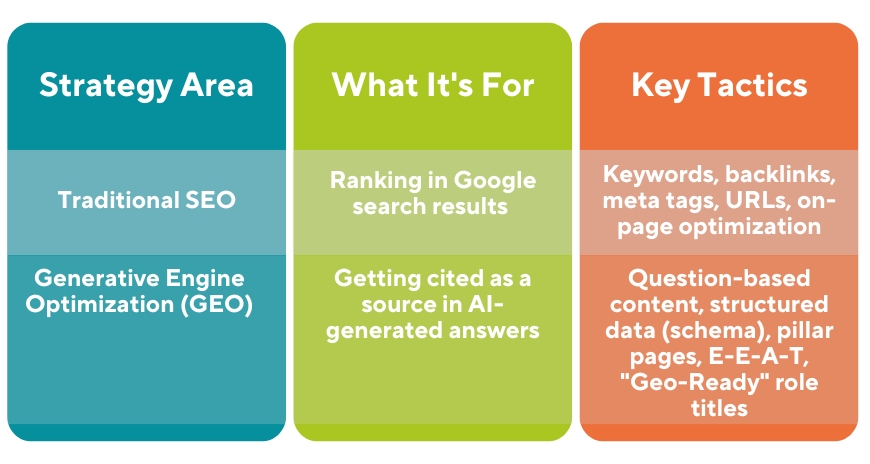
AI Prompt Guide for Volunteer Recruitment
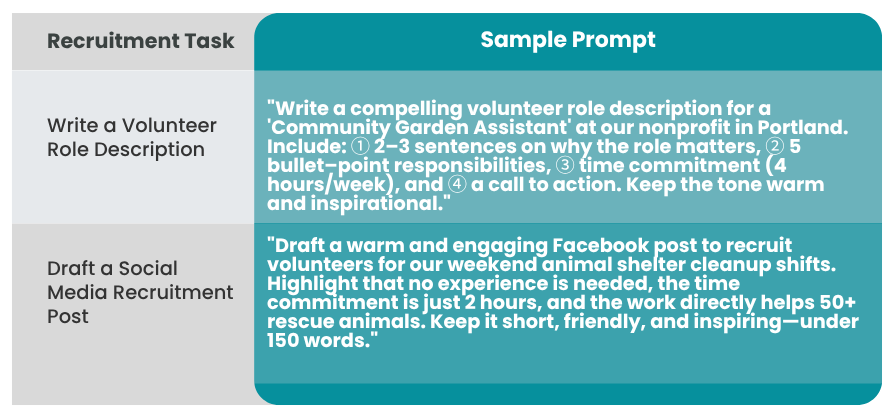
To get the best results from AI tools like ChatGPT, Copilot, or Gemini, your prompt needs to be clear, specific, and contextual.
Here are some example prompts you can use and adapt for your organization:
 By integrating AI into your digital strategy alongside a solid SEO foundation, you’ll be well-positioned to attract passionate, well-matched volunteers who are already searching for meaningful ways to get involved – whether they’re asking Google or an AI assistant.


